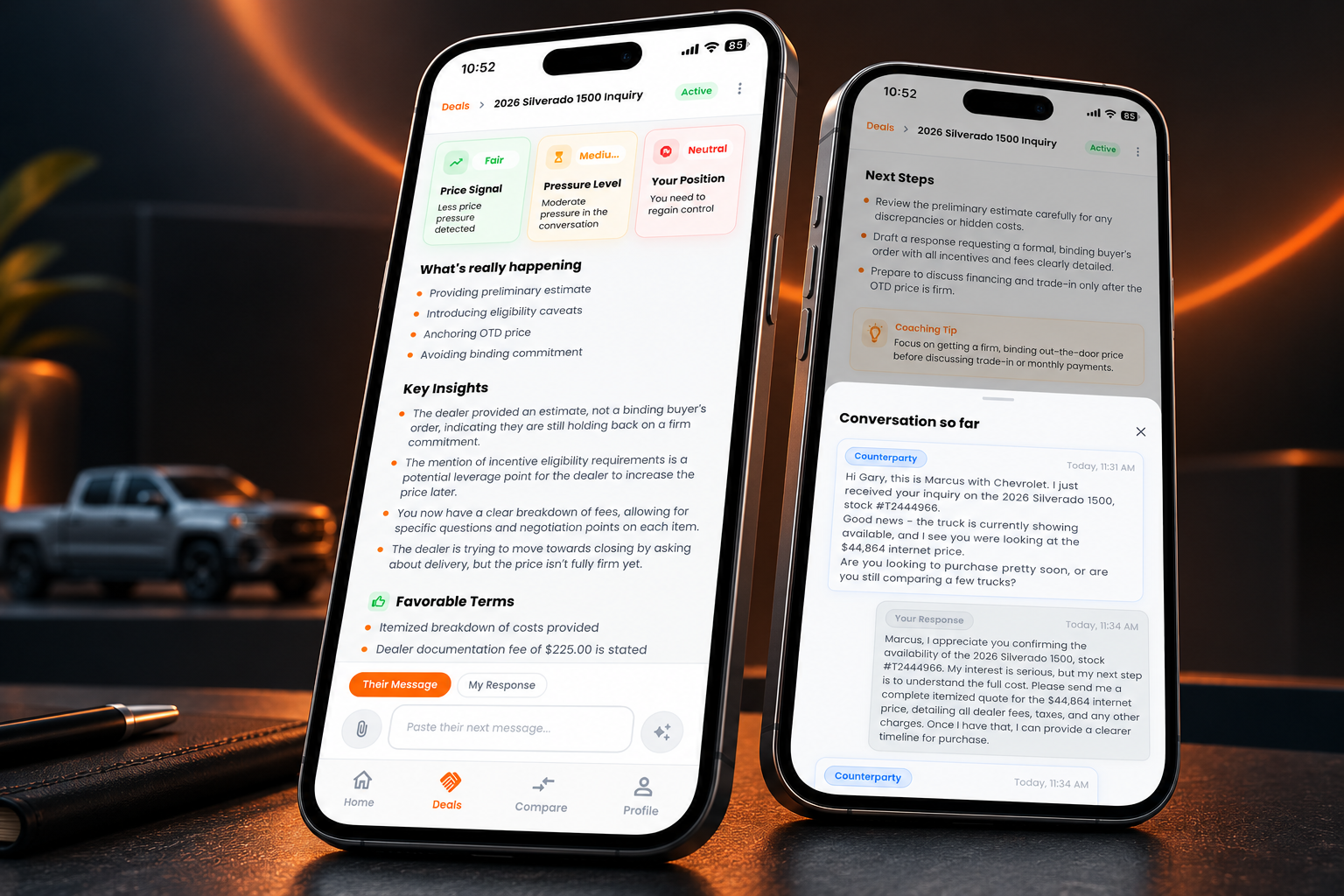
Understand the Deal Before You Respond
Negotix analyzes conversations, identifies negotiation tactics, and helps you respond with confidence.
Step 1 - Paste a Conversation or Upload a Document
Start by selecting your role in the negotiation, whether you're the Customer seeking something or the Counterparty providing a product, service, offer, or opportunity. This helps Negotix analyze the negotiation from your perspective and deliver personalized coaching.
Next, paste a conversation message or upload supporting documents such as screenshots, PDFs, Word documents, offer letters, contracts, buyer's orders, or other negotiation-related files.
Negotix analyzes the conversation to uncover negotiation tactics, identify leverage, evaluate deal quality, highlight risks and opportunities, and provide personalized insights, strategic coaching, and exactly what to say next.
Whether you're negotiating a car purchase, salary, job offer, contract, business agreement, marketplace purchase, or service, simply provide the conversation or documents, Negotix takes care of the analysis.
Step 2 - Understand Your Deal Score & Summary
After analyzing the conversation, Negotix generates a Deal Score that reflects your current position in the negotiation.
The Deal Score helps you quickly understand:
How much leverage you currently have
How favorable the deal terms are
Whether the other side is applying pressure
How strong or risky the negotiation looks overall
Negotix also provides a clear Summary explaining what the other party is signaling, where the negotiation currently stands, and what it likely means for your next move.
Instead of guessing whether you’re winning the negotiation or walking into a bad deal, Negotix gives you a simple, easy-to-understand breakdown of your current negotiation strength in real time.
Step 3 - Correcting an Analysis
Negotix automatically detects who sent the message and tailors its coaching to your role. If the analysis doesn't look right, you can quickly correct the message ownership and instantly regenerate the entire negotiation analysis.
Tap Wrong? Tap to Fix, then select whether the message is It's My Message or It's Their Message. Once you've made the correction, tap Reanalyze Message to regenerate your Deal Score, leverage analysis, insights, tactics, recommended response, and negotiation strategy from the correct perspective.
Use this whenever Negotix has identified the wrong sender or if the coaching appears to be from the wrong side of the negotiation.
Step 4 - See What Negotix Detects
Negotix identifies the negotiation signals hidden inside the conversation and translates them into simple, easy-to-understand insights.
You’ll instantly see:
The other party’s likely intent
How much pressure is being applied
Whether pricing pressure is increasing or weakening
Your current leverage and negotiation position
Instead of trying to guess what the other side is doing, Negotix helps you recognize the signals driving the conversation in real time.
This gives you a clearer understanding of:
when someone is conceding or achoring high
when they are trying to close the deal
when urgency or pressure tactics are being used
and when you’re negotiating from a position of strength or need to regain control of the deal
Step 5 - Continue the Conversation
Conversation So Far
Review the complete negotiation history at any time. Expand the conversation timeline to see previous messages, offers, counter-offers, and key details that have shaped the negotiation. Maintaining full context helps you make informed decisions before responding.
Their Message
Paste or upload the latest message from the other party. Negotix analyzes incoming messages to identify negotiation tactics, leverage changes, pressure points, opportunities, and important details that may impact your position.
My Reply
Respond with confidence using guidance tailored to your negotiation. Choose a recommended response generated from the analysis or write your own message using the coaching, leverage insights, and strategy recommendations provided by Negotix.
Every new message becomes part of the conversation history, allowing Negotix to continuously analyze the negotiation and provide smarter guidance as the discussion evolves.
Recommendation: For the best results, always draft your response in Negotix before sending it through your preferred communication platform. This helps Negotix maintain conversation context and deliver more accurate analysis and coaching.
Step 6 - Get Strategic Insights Before You Respond
Negotix doesn’t just analyze the conversation, it helps you understand what’s likely to happen next.
You’ll receive:
Key Insights explaining the biggest risks, opportunities, and negotiation dynamics
Real-time guidance on what to watch for before moving forward
A Winning Playbook that predicts likely next scenarios in the negotiation
Negotix helps you prepare for situations like:
hidden fees or pricing changes
pressure to commit too quickly
last-minute negotiation tactics
revised offers that may or may not match the agreement
Instead of reacting emotionally or getting caught off guard, you’ll know what signals to watch for and how to stay in control of the negotiation.
Step 7 - Get Responses and Coaching
Negotix generates strategic responses designed to match your negotiation situation, goals, and communication style.
You’ll receive multiple response options with different tones, including:
Professional
Firm
Friendly
Each response also includes coaching insights explaining:
why the response works
what negotiation tactic it addresses
how it protects your leverage
and what outcome it’s designed to achieve
You can copy a response as-is or modify it to fit your own voice and style before sending it.
Copy (for your personal device) and select the message you prefer.
Reminder: Send the message you select or write to Negotix. This allows Negotix to track the full negotiation, detect changing tactics and leverage shifts, and provide more accurate strategic guidance throughout the entire deal.
Step 8 - Compare Multiple Offers Side-by-Side
Negotiating multiple deals at once can get overwhelming fast. Negotix helps you organize, track, and compare active offers in one place.
The Compare Offers feature allows you to:
Group similar negotiations together
Compare current pricing and deal strength
Identify the strongest active offer
Quickly see which deal gives you the best value
Negotix highlights the best current offer based on the negotiation data, pricing, leverage signals, and active deal conditions.
Instead of bouncing between text messages, emails, screenshots, and dealership quotes, you can view your negotiations side-by-side and make more confident decisions with a clearer understanding of which deal is actually strongest.
Built for the Entire Negotiation Journey
Negotix helps you stay organized and in control throughout the entire negotiation process by centralizing your active conversations, offers, and deal activity in one place.
The platform allows you to track ongoing negotiations across multiple categories, revisit previous conversations, monitor negotiation progress over time, and maintain a complete history of your interactions.
Negotix also supports offer organization and comparison, helping you evaluate competing opportunities more efficiently while keeping all related conversations and deal information connected.
As negotiations evolve, deal information can be updated and managed directly within the platform, allowing you to keep negotiations accurate, current, and easy to reference at any stage of the process.
Whether managing one conversation or multiple active deals simultaneously, Negotix is designed to provide a more structured, informed, and strategic negotiation experience from beginning to end.